
Setting up Comfyui on GCP Compute engine with NVIDIA GPU
To run ComfyUI for Image and Video generation with larger models and complex workflow you need a high performing GPU. Consumer grade GPU on local device is not always enough. In such cases Cloud providers provide the way to use online GPU on the Cloud. We are using GCP's Compute engine to access and use such GPU to power ComfyUI
 Praweg Koirala
To setup ComfyUI on GCP compute engine you need a VM instance ( preferably Linux) with GPU option. For this we want to use the Linux image that is best fit for the job
So wat does this mean ? First of all, to run applications that depend to GPU acceleration we need certain drivers that allow the GPU to do its job. In our case we will be using NVIDIA GPU and hence will need its driver. Similarly for most of the applications that run ML algorithms for its AI workload it requires a particular library which is a backbone of these types of workload. This library is pytorch.
Now , we can always select any VM instance we like and download the drivers and dependencies we want but Compute engine already have custom images especially for these types of jobs. These are images that come with these support already pre-built. It comes with NVIDIA driver already installed and pytorch support built in, along with version of python, the core ingredients that are required to start . This saves us some time , this is great especially since GPU usage are comparatively expensive than your average CPU based compute and hence saves us some money in setup and configuration.
Before we can start anything. We need to have access to use GPU’s. Unlike regular instances that runs on CPU alone. GPU’s are not freely available to use and hence need to be provisioned to use first. This means we need to put in a request to use GPU first. We will come back to this and I will walk through how to do this. But first let's have a quick glance of different types of GPU that are available in GCP compute engine , their performance and pricing. Depending on the workload we plan on running with comfyui different GPU’s are required . For example , T4, the lowest spec and cheapest of all the offering with 12GB VRAM can handle simple image generation workflows when working with model files that are moderate to small 5GB and under. However if we want to work with larger models for image or video we need to up our GPU to L4 or A100/H100. This needs to be decided before we create our instance , since GPU can not be simply swapped out once the instance is created. Let's have a quick glance over different GPU options that are available.
GCP GPU Pricing(hourly)
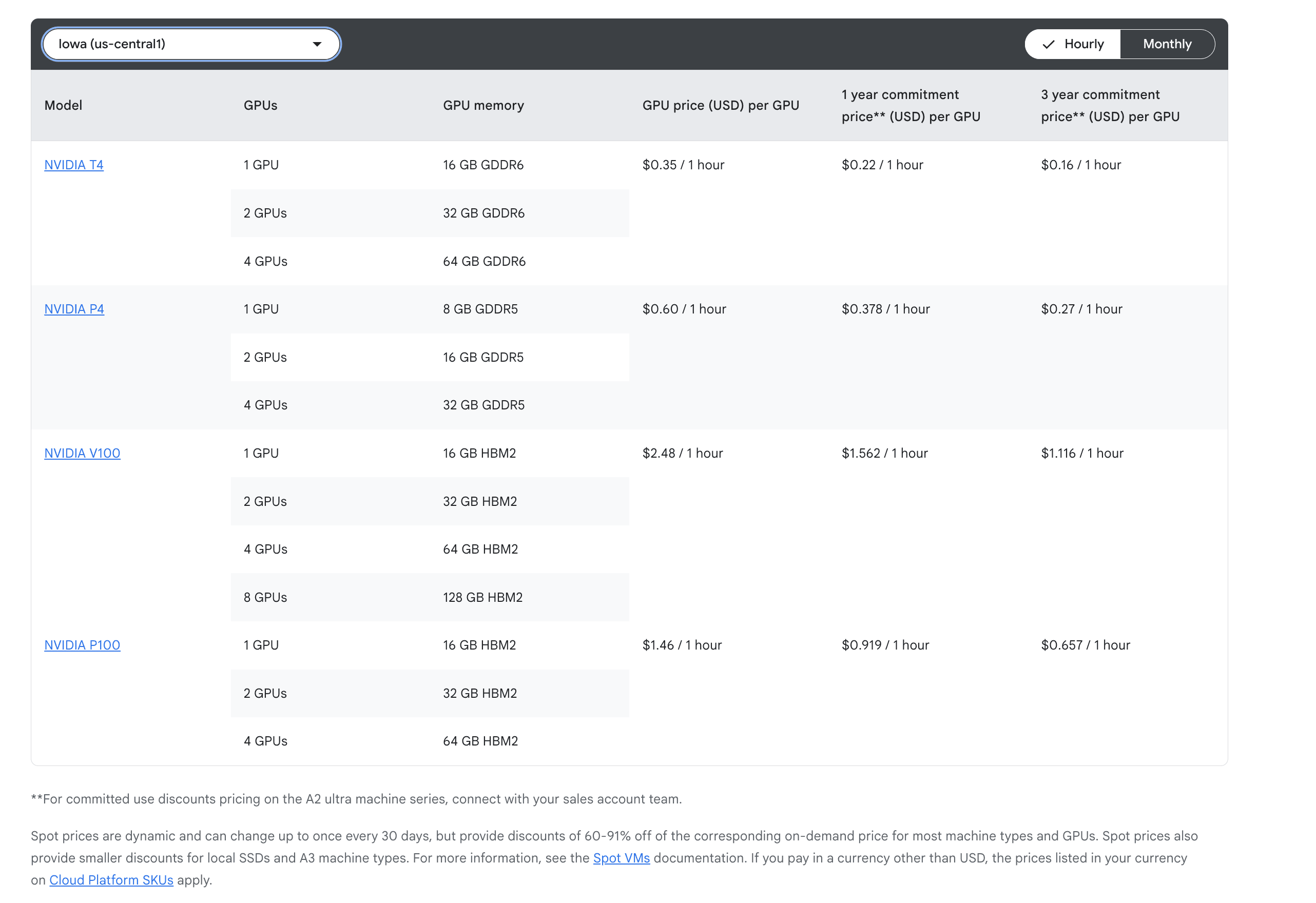
ps: The list does not include all the available options. In our tutorial we are using L4 GPU with 24GB VRAM, not listed in list above. For list of all currently available GPU options checkout GPU configuration in your VM setup console.
